
DNA Quantification and Ploidy Analysis with Ploidics™
16 October 2026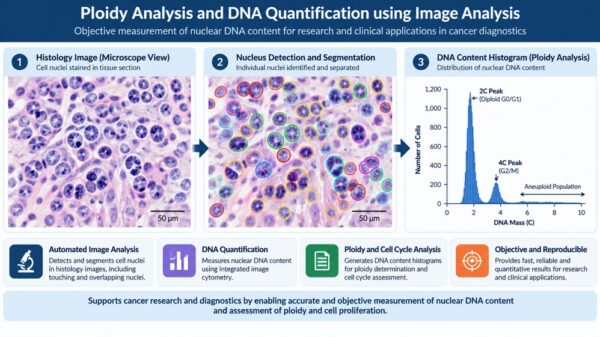
Image-based analysis of cell nuclei to measure DNA content and characterize cell-population distributions
| APPLICATION DNA quantification and ploidy analysis |
INPUT Microscope images / virtual slide images |
OUTPUT Segmented nuclei, cell measurements and DNA-content histogram |
The Analytical Challenge
Ploidy analysis examines the amount and distribution of DNA in individual cells. In tissue samples, the analyst may need to evaluate many nuclei within a mixed cell population, including nuclei that touch or overlap. Manual delineation and measurement can be time-consuming and may introduce variability. A structured image-analysis workflow can help extract nuclear measurements and organize them into a distribution that can be reviewed by a trained specialist.
The Ploidics™ Approach
According to ADCIS, Ploidics™ is a stand-alone image-processing and image-analysis application for digital images captured with an optical microscope and stored on a computer. It can also process virtual slide images of different sizes and depths. The software is designed to measure abnormal DNA content in individual cells within a mixed population and automatically compute a histogram showing the DNA-mass distribution.
The workflow combines automatic nuclear segmentation with options for user review. The software can automatically split touching nuclei; lets users select the nucleus-size range; allows heterogeneous nuclei to be retained or discarded; and lets the user choose the color band appropriate to the stain. Segmentation can also be edited so cells can be selected or deselected for the ploidy analysis.
Illustrated Workflow: From Microscopy Image to DNA Histogram

Conceptual illustration created for this case study. It is not a Ploidics™ screenshot, a patient sample, or a validated analysis result.
The illustration shows the general analysis concept: nuclei are identified in a stained microscopy image, segmentation outlines the individual objects for measurement, and the resulting DNA-content values are summarized as a histogram. Histogram patterns and peak positions are interpreted in the context of the sample, preparation method, controls and the study protocol; the schematic histogram should not be used to classify a real sample.
Analysis Outputs and Data Management
ADCIS’s Ploidics brochure describes a histogram in which DNA mass, normalized to a reference integrated optical density (IOD), is plotted against the number of cells at each DNA-mass level. The number and position of peaks help characterize the distribution. The brochure explains that normal cell populations may show a 2C peak and, when cells are dividing, a 4C peak; abnormal populations can affect histogram shape and peak position. Interpretation depends on the scientific and clinical context and should be performed by appropriately qualified professionals.
The brochure also describes saving cell measurements in Aphelion ObjectSet files and saving histogram-derived measurements in XML, including peak count, peak mass, DNA index, peak area, number of cells, statistical summaries for each class, total cell count and DNA-mass base. Histograms may be saved as TIFF or PDF files, and control-slide and patient-slide data can be organized in patient-specific folders.
Key Capabilities
- Automatic segmentation of nuclei, including automatic splitting of touching nuclei.
- User-controlled selection of nucleus size, stain-related color band and heterogeneous nuclei.
- Manual refinement of segmentation by selecting or deselecting cells for analysis.
- Automatic calculation of DNA-mass distribution histograms for ploidy analysis.
- Quantitative outputs and files to support review, documentation and further analysis.
- Processing of microscope images and virtual slide images, according to ADCIS.
Potential Research and Laboratory Value
By bringing segmentation, measurement and histogram generation into a consistent software workflow, Ploidics can support researchers and laboratory specialists working with nuclear DNA quantification and ploidy assessment. Automated processing can reduce repetitive manual image handling, while editable segmentation allows user review of objects included in the analysis. The resulting measurements and histograms provide structured quantitative data for expert interpretation. These are workflow benefits of the described capabilities, not a claim of improved diagnostic outcomes.
Technical Notes
ADCIS describes Ploidics as stand-alone software for Windows-based PCs. Images are accessed from local hard drives or network storage and organized in folders. Measurements are calibrated and output in real-world units, with the calibration value entered manually as a single value. Please consult ADCIS for current supported operating systems, licensing, compatibility and configuration requirements; the legacy brochure mentions Windows XP or higher and should not be treated as a current compatibility guarantee.
Source and Acknowledgement
This case study is based on ADCIS’s public application description for Ploidics™ and its Ploidics product flyer. Ploidics™ and the described software capabilities belong to ADCIS. Online Solutions acknowledges ADCIS as the source of the product information summarized here.
Application page: https://www.adcis.net/en/applications/ploidics/
Product flyer: https://www.adcis.net/wp-content/uploads/2018/12/Ploidics_FlyerEN.pdf
Disclaimer
This document is an informational application case study based on publicly available ADCIS materials. It is not medical advice and does not establish clinical validity, regulatory status, or suitability for a particular diagnostic or research protocol. The microscopy image and histogram in this document are synthetic explanatory illustrations, not real patient data, official ADCIS product screenshots, or validated measurements produced by Ploidics™. DNA-content and ploidy findings require appropriate sample preparation, calibration, controls, method validation and expert interpretation. Any clinical use must follow applicable regulatory requirements and the software provider’s current instructions and intended-use documentation. Capabilities, compatibility and performance should be confirmed directly with ADCIS before deployment.
Recent Posts

Get the latest updates from ONLSOL directly in your inbox
We'll be glad to help you! Please contact our Sales Team for more information.
Would you like to learn more about Product Details?
Chat with Sales TeamWe'll be glad to help you! Please contact our Sales Team for more information.

Have an Imaging Challenge?
Tell us what you need to see, measure, identify, inspect or analyse.
Let's engineer the imaging approach.